 Billboard
Screen languages
Screens and room panels can speak eleven languages. By default each one follows its device, or you can pick a language for a gallery or a room.
Last updated 28 November 2026
Billboard's own words on a screen, the weather, a countdown, the labels on a listing board, can show in any of eleven languages. So can a room panel. The words you type yourself are never touched.
The languages are English, Spanish, French, German, Italian, Portuguese, Dutch, Chinese (Simplified), Japanese, Korean and Vietnamese.
Out of the box
You don't have to set anything. A screen follows the language of the device it runs on: the Apple TV's language, the iPad's, or the browser's. An Apple TV set to French shows French weather. Anything in a language Billboard doesn't have falls back to English.
Pick one for a gallery
Set a language here when the screen's own setting isn't the one you want, say an Apple TV in a school foyer that was set up in English but faces families who mostly read Vietnamese.
- Open the gallery and select the gear to open Gallery settings.
- Choose Language.
- Under Screen language, pick one. Each screen's own goes back to following the device.
- Select Save.
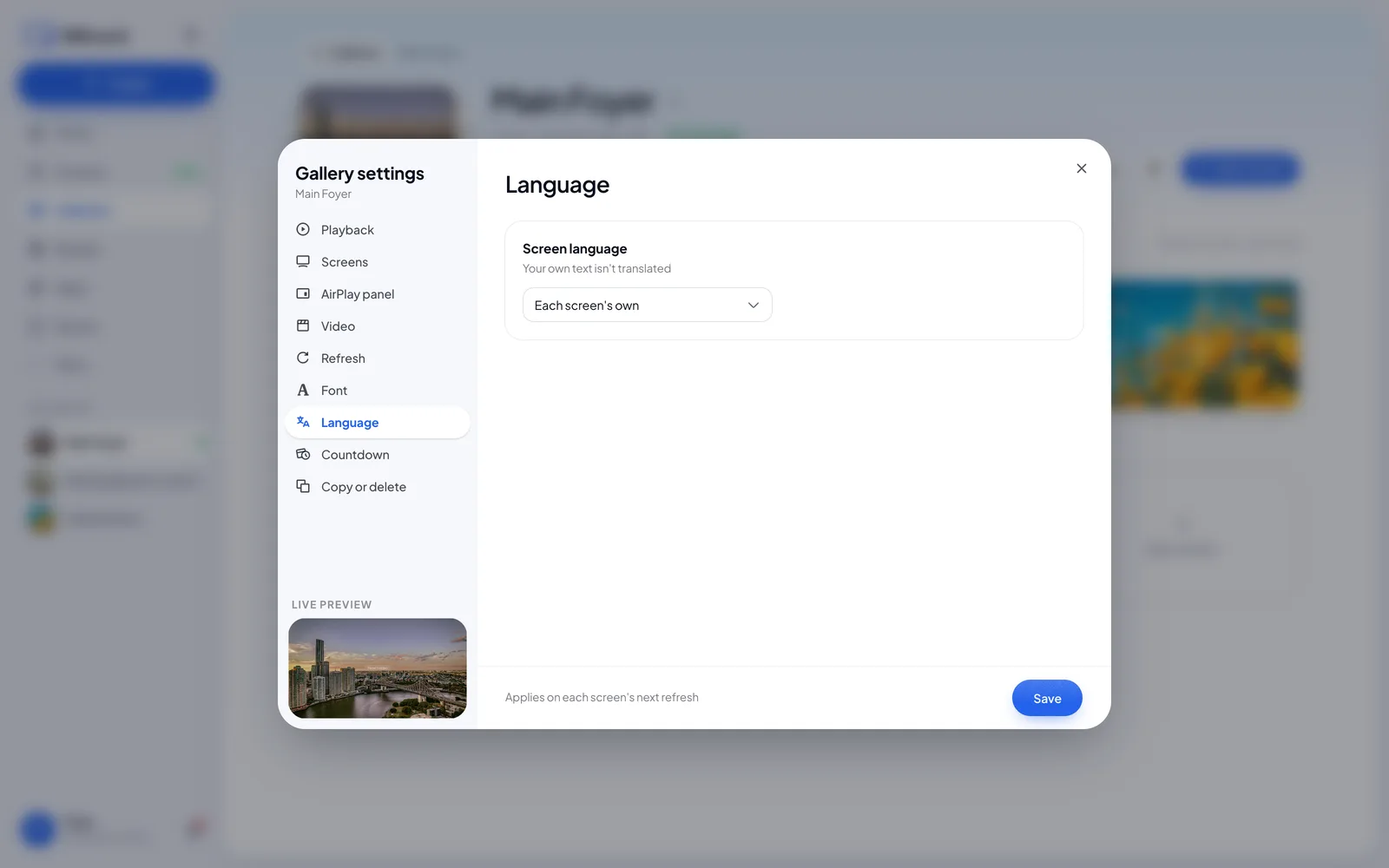
Every screen playing that gallery switches on its next refresh.
Pick one for a room panel
- Open the room from Rooms and select Room settings.
- Go to Panel, then Language, and pick one.
- Select Save.
The panel's state, the free and busy lines, the booking buttons and the booking sheet all change. On a panel in a browser, the timeline also switches to 24-hour time outside English.
What changes and what doesn't
Translated:
- The weather, both the conditions and the line of advice under them.
- Countdowns, including the message on the day if you didn't write your own.
- Listing board labels such as For sale, Sold and Under offer.
- On a room panel, everything the panel says on its own.
Not translated:
- Anything you typed. Board text, captions, notices, room names and meeting titles stay exactly as written, so write them in the language you want on the wall.
- The dashboard. It stays in English.
Apple TV and iPad versions
Weather, countdown messages and listing labels are written by Billboard's servers, so they arrive in the right language on any version of the app. The words the apps draw themselves, like the countdown units or a panel's booking buttons, need Billboard 1.2.2 on the Apple TV and Billboard Rooms 1.0.2 on the iPad. Both update themselves if automatic updates are on. A screen in a browser has everything already.
The translations are ours. If a word reads oddly in your language, tell us at support@getbillboard.app and we'll fix it.